On this page
Search the App Store for "file manager" and you get pages of apps. But your iPhone already has one: the Files app. So is a second one worth it?
For a lot of people, no. For some, it saves real time every week. Here is how to tell which group you're in.
What the Files app already does
Apple's Files app covers more than most people realise:
- Every storage location in one place. iCloud Drive, On My iPhone, USB drives and SD cards, network servers, and cloud services like Google Drive, Dropbox and OneDrive.
- Folders, tags and favourites. Drag folders into Favourites to pin them at the top of Browse.
- Sorting and views. By name, date, size, kind or tag, as a list or icons.
- Previews. PDFs, images, Office files, audio and video open without another app.
- ZIP files. Tap a ZIP to unzip it. Long-press a folder and tap Compress to make one.
- Scanning. Tap ⋯ in Browse, then Scan Documents, to turn paper into a PDF.
- Search by name. Pull down in any folder to search.
If those cover what you do, you don't need anything else.
Where the Files app falls short
1. It doesn't show you what's new
Files is organised by place. But files reach your iPhone from many places at once: Safari downloads, AirDrop, Mail attachments, WhatsApp, Messages. Some go to Files, some to Photos, and some stay inside the app they came from.
The Recents tab helps, but it mixes files you opened with files you received, and it only shows what's in Files.
2. Nothing tidies itself
The Downloads folder only grows. There are no rules like "put every PDF with 'invoice' in the name into Receipts". Every file stays where it landed until you move it by hand.
3. Finding words inside files is hit and miss
Searching by file name works well. Searching for a word *inside* a PDF or a screenshot, like a booking reference, is less reliable in Files. You can search inside one open PDF, but not easily across all of them.
4. Specialist formats and connections
RAR and 7z archives, playing unusual video formats, or streaming from a NAS all need a specialist app.
The comparison
| Files app | A file manager app | |
|---|---|---|
| Price | Free, built in | Usually free to start, then a subscription |
| Storage locations | iCloud, iPhone, drives, servers, cloud apps | Depends on the app |
| Shows newly arrived files | Partly, through Recents | Some apps, like DropMate, are built around it |
| Sorting rules | No | Some apps |
| Search inside files | Limited | Some apps |
| RAR, 7z, NAS streaming | No | Apps like Documents or FE File Explorer |
| Where files are stored | In Files | Some apps keep their own copy, others use Files |
So do you need one?
Ask yourself three questions:
- Do you regularly lose a file you know you received? If yes, the problem is new files, not folders. An inbox-style app helps more than a second folder browser.
- Do you handle RAR files, media libraries or a NAS? If yes, a specialist app like Documents by Readdle or FE File Explorer is worth it.
- Is your Downloads folder hundreds of files long? If yes, you need either a weekly habit or an app that does the sorting for you.
If you answered no to all three, the Files app is enough. Learn its Favourites and tags and you're set.
Where DropMate fits
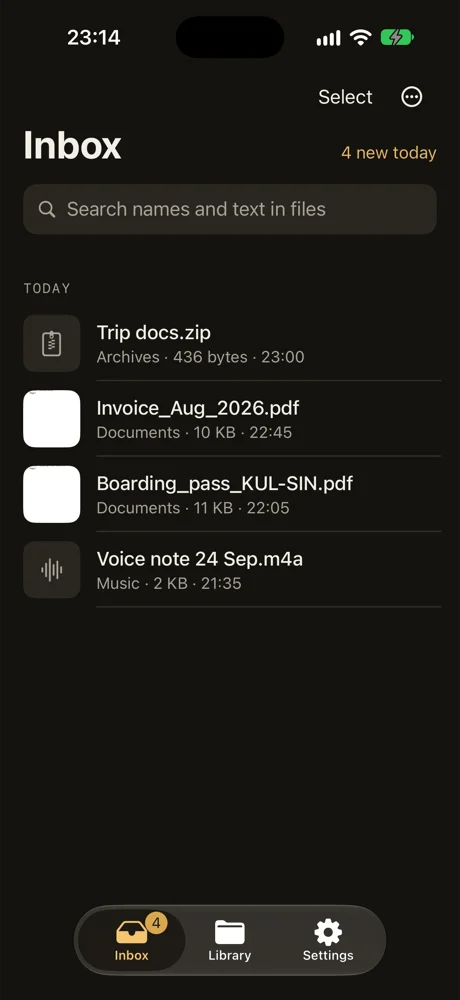
DropMate is built for question 1 and 3. It collects files from Downloads, AirDrop and anything you share to it in one inbox. You swipe a file to keep it in a folder it suggests, or delete it, and kept files go into real folders in the Files app. With Pro, you can search the text inside PDFs and screenshots, read on your iPhone and never uploaded.
It doesn't replace Files. It keeps new files from getting lost on the way there.
Common questions
Is the Files app a file manager?
Yes. It shows iCloud Drive, On My iPhone, USB drives, network servers and cloud services like Google Drive and Dropbox, with folders, tags and sorting.
Can the Files app search inside PDFs?
It finds files mainly by name. You can search inside one PDF once it's open, but searching for a word across all your PDFs and screenshots is hit and miss.
Will a file manager app slow down my iPhone?
No, not by being installed. Apps that keep their own copies of files use extra storage, so check how much space they use under Settings › General › iPhone Storage.