
On this page
When you download a file in Safari, it goes to the Downloads folder in the Files app. Photos and videos are different: they usually go to the Photos app.
How to find your Downloads folder
- Open the Files app.
- Tap Browse at the bottom.
- Tap iCloud Drive or On My iPhone, depending on your setting (see below).
- Open the Downloads folder.
Change where Safari saves downloads
- Open Settings.
- Go to Apps, then Safari. On older iOS versions, Safari is in the main Settings list.
- Tap Downloads.
- Choose iCloud Drive, On My iPhone, or another folder.
iCloud Drive keeps downloads on all your devices but uses iCloud storage. On My iPhone keeps them only on this phone.
Where do other files go?
- AirDrop: photos and videos go to Photos. Other files, like PDFs, either open in an app or are saved to Downloads in Files.
- Mail attachments: they stay inside the email until you save them. Tap the attachment, then the share button, then Save to Files.
- WhatsApp and Messages: files stay inside the chat until you save or share them.
That is why files feel like they disappear: each app keeps them somewhere different.
Keep your downloads from piling up
The Downloads folder fills up fast, and nothing ever leaves it unless you clean it yourself. A few habits help:
- Once a week, move what you need into a folder like Travel or Receipts.
- Delete installers, duplicates and old ZIP files.
- Sort by Size in Files to find the biggest files first.
An easier way
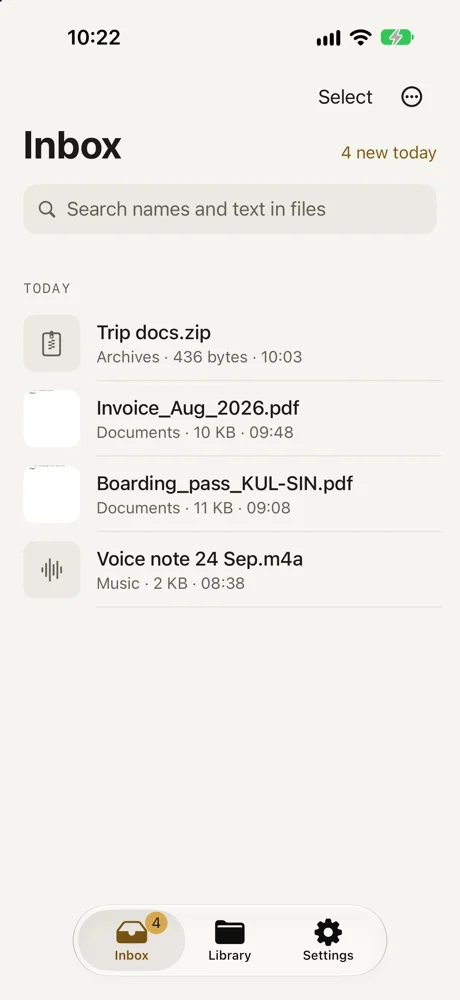
DropMate watches your Downloads folder and shows every new file in one inbox, together with files you AirDrop or share from Mail and WhatsApp. Swipe left to keep a file in the right folder or delete it. Free for your first 20 files.
Common questions
Why can't I find my Downloads folder?
Safari can save downloads to iCloud Drive or On My iPhone. Check both under Browse in the Files app, or check which one is set under Settings › Apps › Safari › Downloads.
Where do downloaded photos and videos go?
Images you save from Safari with Save to Photos or Save Image go to the Photos app, not to Downloads.
Does the Downloads folder clear itself?
No. Files stay there until you move or delete them, so it keeps growing.